今天在 SQL Server 2000 的叢集上變更 Virtual IP 並將的 SQL Server 虛擬執行個體成功上線,在 AP Server 無法透過 TCP/IP 連線到 DB,在 AP Server 直接 telnet “SQL Virtual Name” 1433也失敗。 當下檢查 SQL Server TCP/IP 的 Port 是否為 1433 用 netstat –an 查看,沒有人用 1433,怪怪的,應該 SQL Server 會用的啊 查看SQL Server 錯誤記錄會報告下列錯誤訊息: SuperSocket 資訊: TCP 埠 1433 繫結失敗 接著…
- Mar 29 Thu 2012 21:37
-
SQL Server 容錯移轉叢集節點上變更 IP 位址時,出現錯誤訊息:繫結失敗
- Mar 29 Thu 2012 14:53
-
Windows 8 keyboard shortcuts
Windows key – Brings up the Metro start screen. You can start typing to search for an app, just like the Win7 start menu. Windows key + B – Switch to the (classic) Windows desktop and select the tray notification area. Windows key + C – Brings up the Charms menu, where you can search, share, and change settings. Windows key + D – Brings up the old Windows desktop. Windows key + E – Launch Windows Explorer with Computer view displayed. Windows key + F – Brings up the Metro File search screen. Windows key + H – Opens the Metro Share panel. Windows key + I – Opens the Settings panel, where you can change settings for the current app, change volume,
- Mar 29 Thu 2012 13:31
-
第九屆的微軟實習計劃報名
官網 www.microsoft.com/taiwan/campus/ Facebook www.facebook.com/Microsoft.Student.Program
- Mar 26 Mon 2012 15:37
-
如何移動 Quorum Disk 在Windows 2008 R2
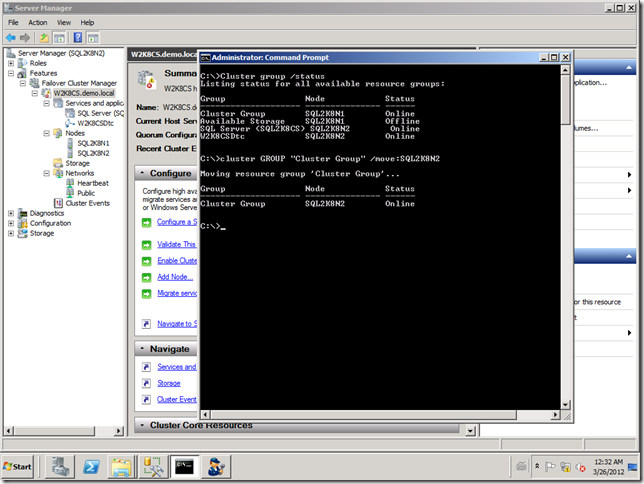
目前在 Windows 2008 R2 中的 Failover Cluster Manager GUI 的畫面中找不到這個功能 可以透過 Cluster.exe 的指令出 Quorum Disk 的 Group 再把它移到另一個 Node
- Mar 26 Mon 2012 12:39
-
“Microsoft Forums” 行動裝置版來了

- Mar 26 Mon 2012 09:57
-
如何建置 Windows Azure SDK + VS 10 + VS 11 的開發環境
用同一個開發環境,同時開發 Win 8 Metro Style App + Windows Azure Platform Services。 可以參考下列文章: Installing the Windows Azure SDK for .NET on a Developer Machine with Visual Studio 2010 and Visual Studio 11 http://www.windowsazure.com/en-us/develop/vs11/
- Mar 21 Wed 2012 10:19
-
Hotmail 獨家 60 秒信箱瘦身術
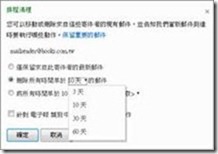
Ø 第一招:大量郵件一指搞定 · 收件匣中經常充滿大量電子報,雖然不常閱讀,但大量電子報往往埋沒了重要郵件。這時,可運用「刪除寄件者的所有郵件」,一秒鐘立刻將灰色郵件刪除。如無法馬上判斷資料去留與否,也可以另建子資料匣,透過「移動寄件者的所有郵件」,即可將電子報迅速收納在同一個資料夾。統計過去曾使用郵件整理功能的使用者中,有 90% 選擇「刪除寄件者的所有郵件」,且有 60% 的使用者開始設定規則「移動日後來自寄件者的所有郵件」,來有效管理大量灰色郵件,讓信箱井然有序。
- Mar 14 Wed 2012 04:01
-
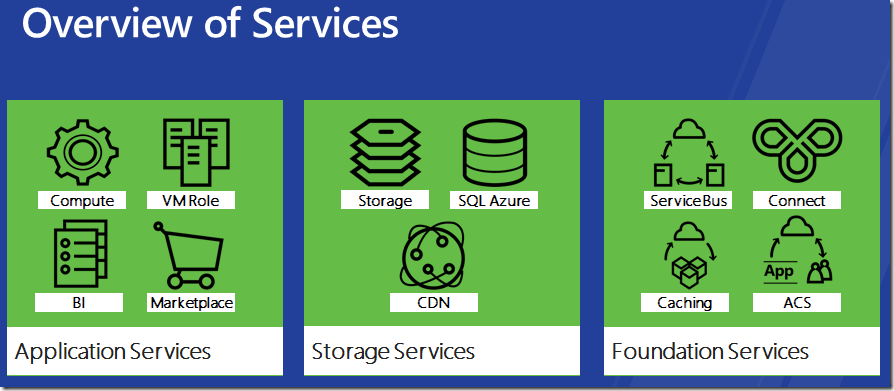
Windows Azure Platform 所提供的服務
- Mar 13 Tue 2012 23:06
-
如何在 Windows Service 跟 Windows Form Application 間交換資料?
今天有朋友問我這個問題,我當下只有想到利用 Registry 或是找個地方暫存資料,Windows Service 跟 Windows Form Application 再去讀取及寫入 印象中有有 IPC (interprocess communications)的方式,但在 C# 又是如何做? 找到了兩篇文章 Interprocess Communication using Named Pipes in C# Inter-Process Communication in .NET Using Named Pipes, Part 1
- Mar 13 Tue 2012 11:58
-
Windows Store 之 apps 授權大小事
原文: http://blogs.msdn.com/b/windowsstore/archive/2012/03/12/licensing-apps.aspx 筆者讀到重點: 1. Windows 8 Beta 時的 apps 需要一個 Windows Live ID 登入來下載 2. 開發者可以對 Apps 設定試用期間 1 天 ~ 無限 3. 可以從試用版直接付 $$ 變成正式版 4. In-app purchases 模式也支援的 (聽說現在這個模式很會賺 $$ ) 5. 一個 app 可以安裝在 5 台電腦上, 第 6 台要將的話, 會將前 5 台其中一台換掉即可, 緦數不要超過 5 即可
- Mar 07 Wed 2012 14:20
-
Windows 8 快速鍵
如果你的手幾乎都是黏在鍵盤上的使用者,那你可以參考下列的連結:
http://www.winsupersite.com/article/windows8/windows-8-consumer-preview-windows-key-keyboard-shortcuts-142358
像是 WINKEY + I 就會出現是否要關機或是從開電腦的選項,一開始也找了一下.
Enjoy.
http://www.winsupersite.com/article/windows8/windows-8-consumer-preview-windows-key-keyboard-shortcuts-142358
像是 WINKEY + I 就會出現是否要關機或是從開電腦的選項,一開始也找了一下.
Enjoy.
- Mar 07 Wed 2012 03:53
-
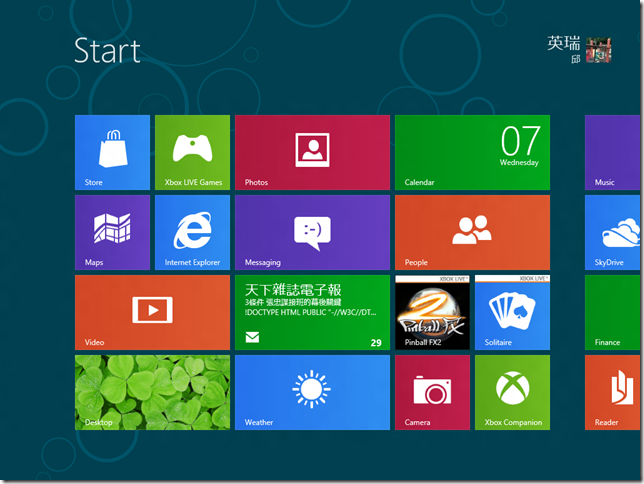
Windows 8 Beta + Visual Studio 11 Beta 安裝完成
Windows 8 Build 8250. Visual Studio 11 Beta 開始進行 Windows 8 App 修練. Note:啟動 Visual Studio 11 Beta 時會要一組 Windows Live 帳號開啟 Windows 8 developer license.