目前在 Windows 2008 R2 中的 Failover Cluster Manager GUI 的畫面中找不到這個功能
可以透過 Cluster.exe 的指令出 Quorum Disk 的 Group 再把它移到另一個 Node
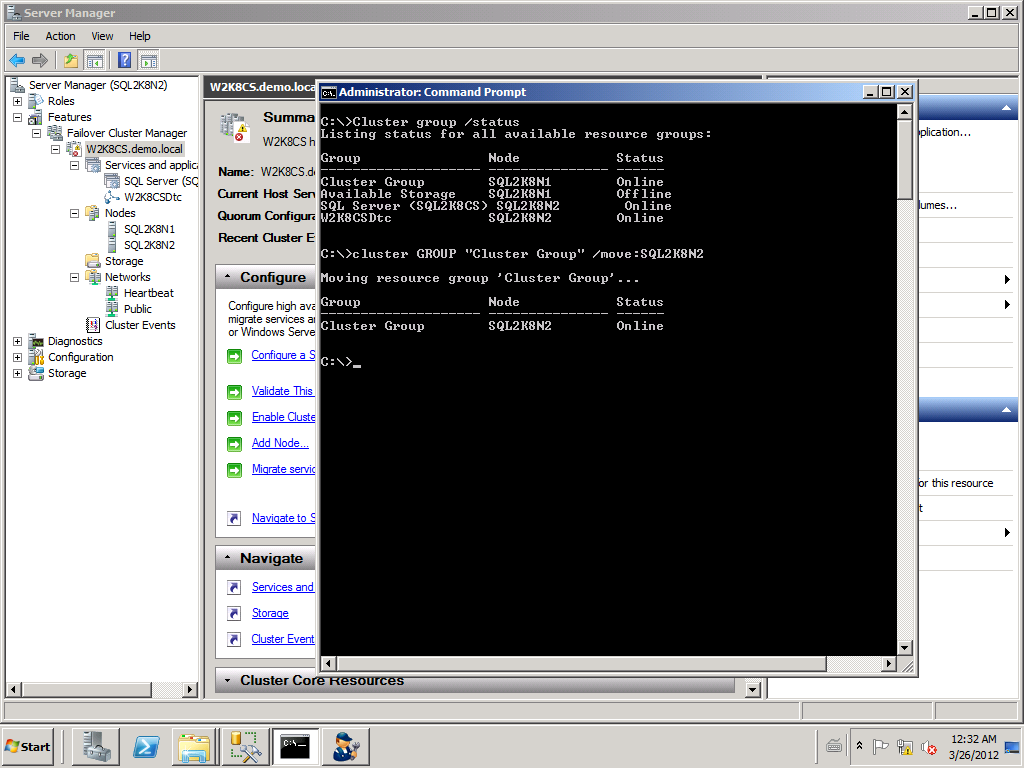
目前在 Windows 2008 R2 中的 Failover Cluster Manager GUI 的畫面中找不到這個功能
可以透過 Cluster.exe 的指令出 Quorum Disk 的 Group 再把它移到另一個 Node
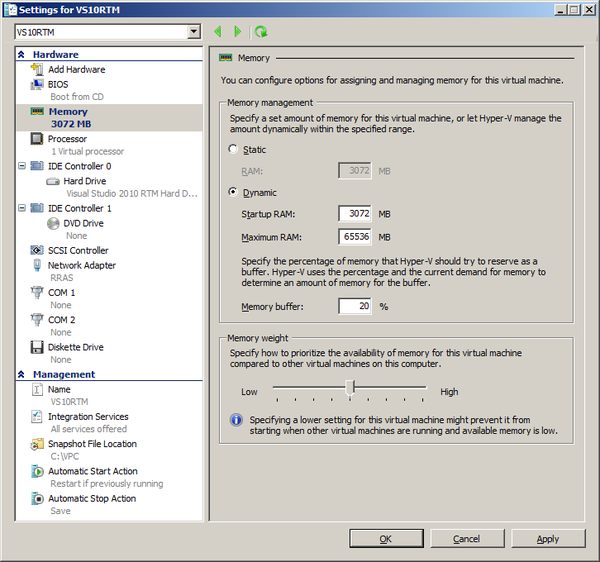
在 2008 R2 SP1 中,覺得 Dynamic Memory 很不錯用,因為可以給定記憶體的基本值及最大使用量,故可以讓 Hyper-V 同時間啟動更多的虛擬機器。不像之前都是固定值,只要虛擬機器一啟動後,就直接佔住記憶體。
今天早上電腦不知為何藍底白字了兩次,用 WinDbg 打開 minidump 來看了一下
發現是 netw5v64.sys 的問題,查了一下是網卡相關的,所以就找了新的網卡驅動程惑更新
Dump 中的部份資訊
FOLLOWUP_IP:
netw5v64+6009
fffff880`03aac009 ?? ???
SYMBOL_STACK_INDEX: 3
SYMBOL_NAME: netw5v64+6009
FOLLOWUP_NAME: MachineOwner
MODULE_NAME: netw5v64
IMAGE_NAME: netw5v64.sys
DEBUG_FLR_IMAGE_TIMESTAMP: 49cbab84
FAILURE_BUCKET_ID: X64_0xc2_b_netw5v64+6009
BUCKET_ID: X64_0xc2_b_netw5v64+6009
Followup: MachineOwner
---------
1: kd> lmvm netw5v64
start end module name
fffff880`03aa6000 fffff880`03fe1000 netw5v64 T (no symbols)
Loaded symbol image file: netw5v64.sys
Image path: \SystemRoot\system32\DRIVERS\netw5v64.sys
Image name: netw5v64.sys
Timestamp: Fri Mar 27 00:21:24 2009 (49CBAB84)
CheckSum: 00533DE3
ImageSize: 0053B000
Translations: 0000.04b0 0000.04e4 0409.04b0 0409.04e4
Windows HPC Server 2008 R2 provides a scalable, reliable, and secure interactive application platform that empowers developers to rapidly develop and easily modify cluster-enabled interactive applications that are based on the Service Oriented Architecture programming model.
This article provides a technical overview of cluster-enabled SOA application development. The HPC Class library includes the APIs that a client application can use to create sessions on the cluster. The APIs support creating reliable sessions and client interaction models such as file and recollect, batch, and shared session clients. This article also addresses the service configuration file, the Windows HPC infrastructure that supports SOA workloads, and broker node and session management and monitoring.
下載位置:
http://www.microsoft.com/downloads/en/details.aspx?FamilyID=2eee1981-c0b9-4a19-859d-73755ea898e7
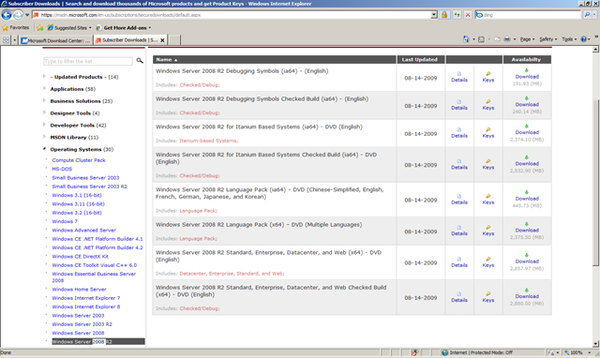
MSDN 訂閱已提供 Windows 2008 R2 RTM 囉.
Enjoy.
This document addresses late-breaking issues and information about the Windows Server® 2008 R2 operating system that are less critical than those reported in Release Notes: Important Issues in Windows Server 2008 R2 (http://go.microsoft.com/fwlink/?LinkId=160340). It serves as an overflow from that document if the number of issues discovered becomes excessive for one document. Currently, all known issues are reported in the release notes.
For information about by-design changes, new features, and fixes in this release, see Other Changes in Windows Server 2008 R2 (http://go.microsoft.com/fwlink/?LinkID=160339).
For information about important steps to take before installing this release, including issues that you may need to work around, see Installing Windows Server 2008 R2 (http://go.microsoft.com/fwlink/?LinkID=160341). Unless otherwise specified, these notes apply to all editions and installation options of Windows Server 2008 R2.
Enjoy.
最近筆者將筆記型電腦安裝 Windows Server 2008 R2 的 RC 版,發現它對硬體的支援相當的好,連無線網卡都不用再額外安裝驅動程式,這點真的是蠻方便的。
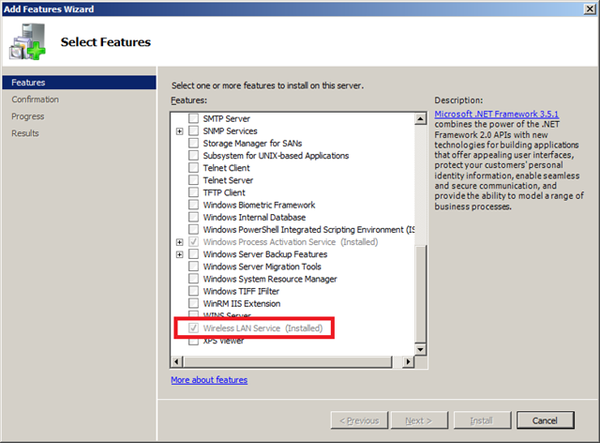
唯一要做的動作即是將這個功能啟用即可,透過『Server Manager』的 Add Feature 安裝『Wireles LAN Service』,完成。如下圖:
畢竟這是 Server 的產品,預設下,很多 Server 平日用不到的功能都不會預裝,這點筆者覺得很合理。
Windows Server 2008 R2 RC 版的效能也是很不錯的,有興趣的朋友可以試試。
筆者使用的環境為 Windows Server 2008 R2 RC 7100 Build.
Enjoy.
目前在許多的 Web 應用中有很多的技術可以用來開發,例如微軟的 .NET、Java 或是 PHP 等相關技術。其中 PHP 在許多的大型網站也可以看到其應用的蹤跡,但是大多數的文件都是告訴各位如何在像是 Apache 等 Web 伺服器上進行設定。如何快速在微軟的 IIS7 上進行設定讓它也能夠順利的執行 PHP 程式。
Enjoy.
Microsoft Windows Server 2008 R2 will be the next version of the Windows Server operating system from Microsoft. Building on the features and capabilities of the current Windows Server 2008 release version, Windows Server 2008 R2 allows you to create solutions that are easier to plan, deploy, and manage than previous versions of Windows Server.
下載位置:
相關文件:
Release Notes: Important Issues in this Beta Release of Windows Server 2008 R2
Things to Know About This Beta Release of Windows Server 2008 R2
Windows Server 2008 R2 產品資訊及說明.
Enjoy.


