好料的來了.
通過檢測可以拿到免費上架Token的登錄網站上線了: http://www.microsoft.com/taiwan/promo/metro-app/
只要一個半天即可;另外一個小提醒,報名愈早的梯次較好,若檢測不成也許還有第二次的機會。
好處:
1. 貴公司的程式有機會在 RTM 之前將程式上架到 Windows Store.
2. 此活動免費
好料的來了.
通過檢測可以拿到免費上架Token的登錄網站上線了: http://www.microsoft.com/taiwan/promo/metro-app/
只要一個半天即可;另外一個小提醒,報名愈早的梯次較好,若檢測不成也許還有第二次的機會。
好處:
1. 貴公司的程式有機會在 RTM 之前將程式上架到 Windows Store.
2. 此活動免費
歩驟及畫面整理如下:
1. Visual Basic 6
2. Install .NET Framework 4.0
3. Install Visual Studio 2010 Team Explorer (optional: service pack 1)
4. Install Team Foundation Server MSSCCI Provider 2010 32-bit.
安裝完成後, 可以從 Tools=> Team Foundation 選單中進行操作
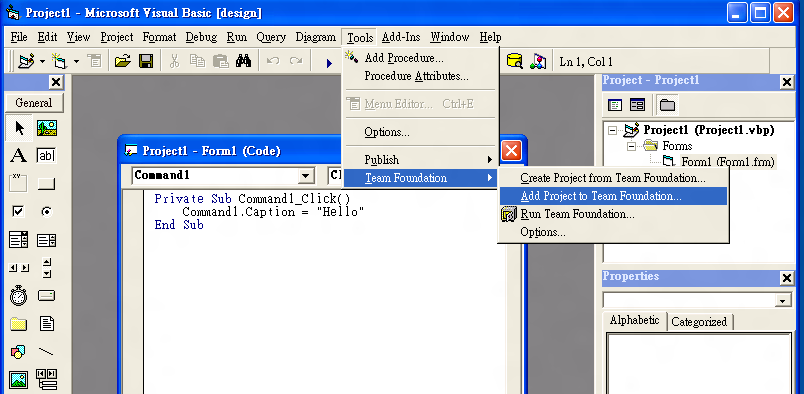
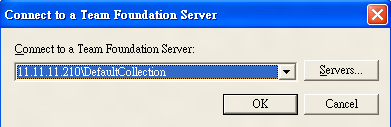
先連結 Team Foundation Server, TFS Server URL 如: http://YourServer:8080/tfs
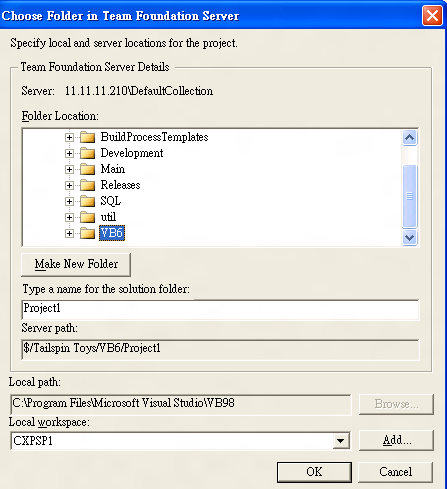
可以自行建立資料夾
選擇要簽入的項目
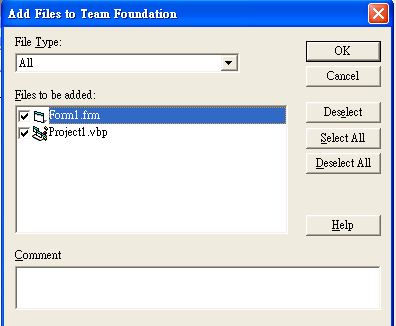
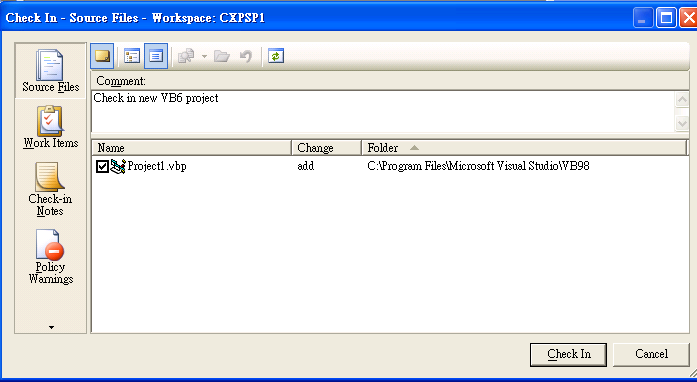
簽入並寫註解
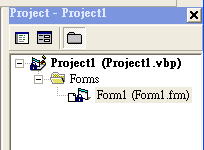
簽入完成後, 每個項目會出現鎖頭圖示
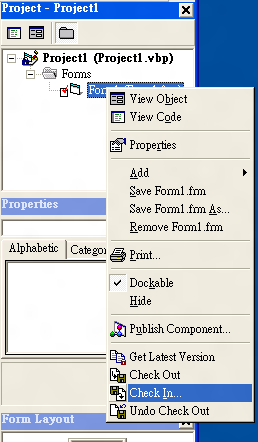
右鍵可以操作簽出, 簽入等動作
Enjoy.
Microsoft is releasing the following seven new security bulletins for newly discovered vulnerabilities:
| Bulletin ID | Bulletin Title | Max Severity Rating | Vulnerability Impact | Restart Requirement | Affected Software |
| Vulnerability in Microsoft Word Could Allow Remote Code Execution (2680352) | Critical | Remote Code Execution | May require restart | Microsoft Word 2003, Word 2007, Office Compatibility Pack, Office 2008 for Mac, and Office for Mac 2011. | |
| Vulnerabilities in Microsoft Office Could Allow Remote Code Execution (2663830) | Important | Remote Code Execution | May require restart | Microsoft Excel 2003, Excel 2007, Excel 2010, Excel Viewer, Office 2007, Office 2010, Office Compatibility Pack, Office 2008 for Mac, and Office for Mac 2011. | |
| Vulnerability in Microsoft Visio Viewer 2010 Could Allow Remote Code Execution (2597981) | Important | Remote Code Execution | May require restart | Microsoft Visio Viewer 2010 | |
| Vulnerability in TCP/IP Could Allow Elevation of Privilege (2688338) | Important | Elevation of Privilege | Requires restart | Microsoft Windows Vista, Windows Server 2008, Windows 7, and Windows Server 2008 R2. | |
| Vulnerability in Windows Partition Manager Could Allow Elevation of Privilege (2690533) | Important | Elevation of Privilege | Requires restart | Microsoft Windows Vista, Windows Server 2008, Windows 7, and Windows Server 2008 R2. | |
| Combined Security Update for Microsoft Office, Windows, .NET Framework, and Silverlight (2681578) | Critical | Remote Code Execution | May require restart | Microsoft Office 2003, Office 2007, Office 2010, .NET Framework, Windows XP, Windows Server 2003, Windows Vista, Windows Server 2008, Windows 7, Windows Server 2008 R2, Silverlight 4, and Silverlight 5. | |
| Vulnerabilities in .NET Framework Could Allow Remote Code Execution (2693777) | Critical | Remote Code Execution | May require restart | Microsoft .NET Framework, Windows XP, Windows Server 2003, Windows Vista, Windows Server 2008, Windows 7, and Windows Server 2008 R2. |
Summaries for new bulletin(s) may be found at http://technet.microsoft.com/security/bulletin/MS12-may.
| ID | Product | Title |
| Windows 7 / Vista | 如何清除 Windows 7 / Windows Vista 中開始【執行】的歷史記錄(一點通系列) | |
| Outlook 2010 | 爲什麽重新安裝 Outlook 2010 之後,【管理規則及通知】選項不見了?(一點通系列) | |
| Outlook for Mac | 爲什麽 Outlook for Mac 2011 同步服務清單都是空白選項呢?(一點通系列) | |
| Internet explorer 8 / 9 | 如何解決 Internet Explorer 8 / 9 瀏覽 Pchome 股市技術分析圖時,總提示安裝 Java 軟體(一點通系列) | |
| Outlook for Mac | 爲什麽 Outlook for Mac 2011 收件夾中突然看不到【在我的電腦上】資料夾呢?(一點通系列) | |
| Excel 2011 | 如何解決 Excel 2011 使用拼字檢查時,出現【無法啟動拼字檢查員】?(一點通系列) | |
| Windows 7 | 如何解決 Windows 7 Media Center 突然無法錄製電視了?(一點通系列) | |
| Windows Server 2008 | 如何解決 adprep.exe 昇級 Windows 2000/2003/2008 網域時所遭遇的問題(一點通系列 - MVP 撰寫) | |
| Word 2010 | 如何快速移除 Word 文件中所有的「索引標記」?(一點通系列 - MVP 撰寫) | |
| Excel 2010 | 如何在 Excel 2010 中,啟用「多重彙總資料範圍」的樞紐分析功能?(一點通系列 - MVP 撰寫) | |
| Word 2010 | 在 Word 2010 合併列印中,如何自動排除重複的資料?(一點通系列 - MVP 撰寫) | |
| Word 2010 | 如何在 Word 2010 中設定多層次索引?(一點通系列 - MVP 撰寫) | |
| Word 2010 | 如何將 Word 2010 自訂段落樣式移植到其他檔案中?(一點通系列 - MVP 撰寫) | |
| Excel 2010 | 如何設定 Excel 2010 錄製巨集的快速鍵?(一點通系列 - MVP 撰寫) | |
| Excel 2010 | 如何在 Excel 2010 中將數值設定成以「千」或「百萬」為單位的格式?(一點通系列 - MVP 撰寫) | |
| OneNote 2010 | 如何利用 OneNote 2010 轉換連續的圖片檔?(一點通系列 - MVP 撰寫) | |
| Windows 7 | 如何解決連接至已經設定允許 Everyone 讀取的共用資料夾時,仍出現詢問帳號密碼對話視窗(一點通系列 - MVP 撰寫) | |
| Microsoft Visual C | C# 中如何以迴圈方式設定 struct 內的陣列的值?(一點通系列 - MVP 撰寫) |
Enjoy.
如果您提供的是正確的常見的 Microsoft 偵錯工具會使用 SymSrv 技術symsrv_NT_SYMBOL_PATH 環境變數中的語法。 這些工具會自動包含與符號路徑變數中提供的任何項目。
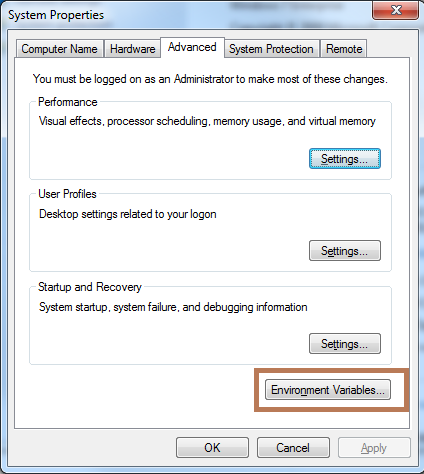
您可以設定這個變數,作為系統變數或使用者環境變數。 若要從桌面執行這項操作上, 按一下滑鼠右鍵[我的電腦然後按一下屬性. 在進階索引標籤上按一下環境變數.
您也可以在命令提示字元暫時設定這個變數。 以此方式透過命令提示字元啟動的所有應用程式會繼承此設定。 例如:
設定 _NT_SYMBOL_PATH = symsrv*symsrv.dll*f:\localsymbols*http://msdl.microsoft.com/download/symbols



Enjoy.
參考資訊:
” 三大準則確保網路密碼的安全”,告訴您如何保護網路密碼安全,降低從事網路交易或其他線上活動時密碼被竊取的風險。
還在擔心放在雲端的資料會被駭?害怕雲端的電子郵件內容被偷窺、個人隱私權被侵犯嗎?微軟為具體實踐提供客戶雲端資料安全與隱私權保護的承諾,繼去(2011)年11月成為全球第一家通過ISO 27001資訊安全管理系統標準認證的雲端服務業者後,再進一步揭露「Windows Azure和Office 365資安與隱私權白皮書」,公開並詳細回應雲端資安聯盟(Cloud Security Alliance, CSA)針對資安與隱私權保護所提出的雲端控管矩陣(Cloud Control Matrix, CCM)之具體作法。想進一步了解微軟對於資安與隱私權保護的具體程序可,下載白皮書(http://www.microsoft.com/download/en/details.aspx?id=26647)
如果您是使用 Windows 7 安裝 Visual Studio 11 beta ,要開發 Metro Style App,那您會發現沒有 Metro Style Template 消失了,如下圖:
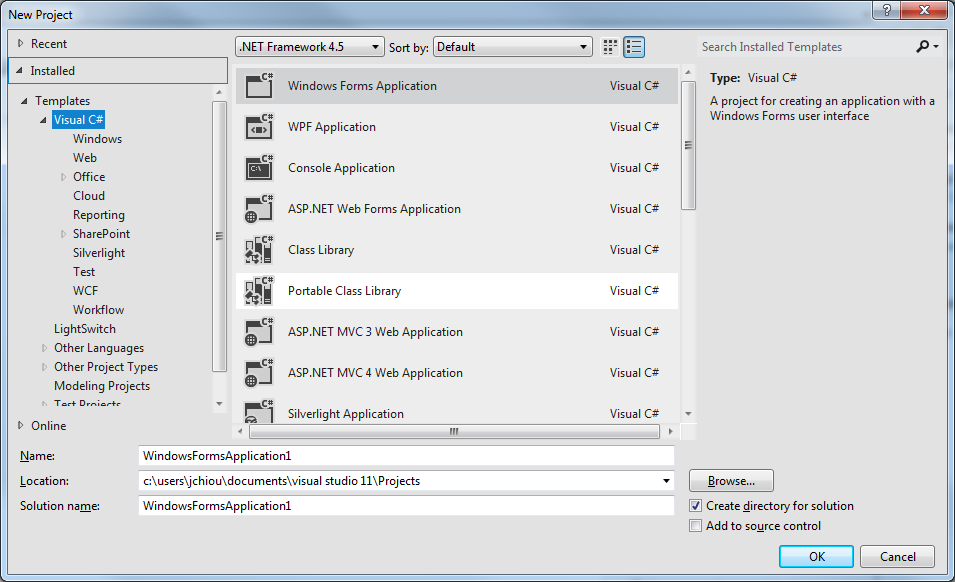
是的,因為目前的 Metro Style Template 是只有在 Windows 8 Consumer Preview+ Visual Studio 11 時才會出現。
也就是說,若是使用 Windows 7 或是 Windows Server 8 Beta 再安裝 Visual Studio 11 Beta 是沒有 Metro Style Template 的哦!
Enjoy.
微軟產品的授權如何計算?別擔心,還有超人氣「授權小老師」親切解說正確授權
E9 釘選功能越來越受到台灣網站經營者的青睞,當網站被消費者釘選在 Windows 7 的工具列後,不但大幅拉近消費者與網站的距離,動態的跳躍清單設計也讓網站經營者可以更即時提供消費者最在乎的訊息,加深與消費者的互動。KKBOX 的跳躍清單除了提供網友 FB 粉絲團、 YouTube 等快速連結,還增加了即時的娛樂動態,讓網友不用登入就可以看到最新消息。活動期間,只要釘選 KKBOX 還可以參加『免費聽 KKBOX 一整年』的抽獎活動。


